A Professional Gremlin Query Editor
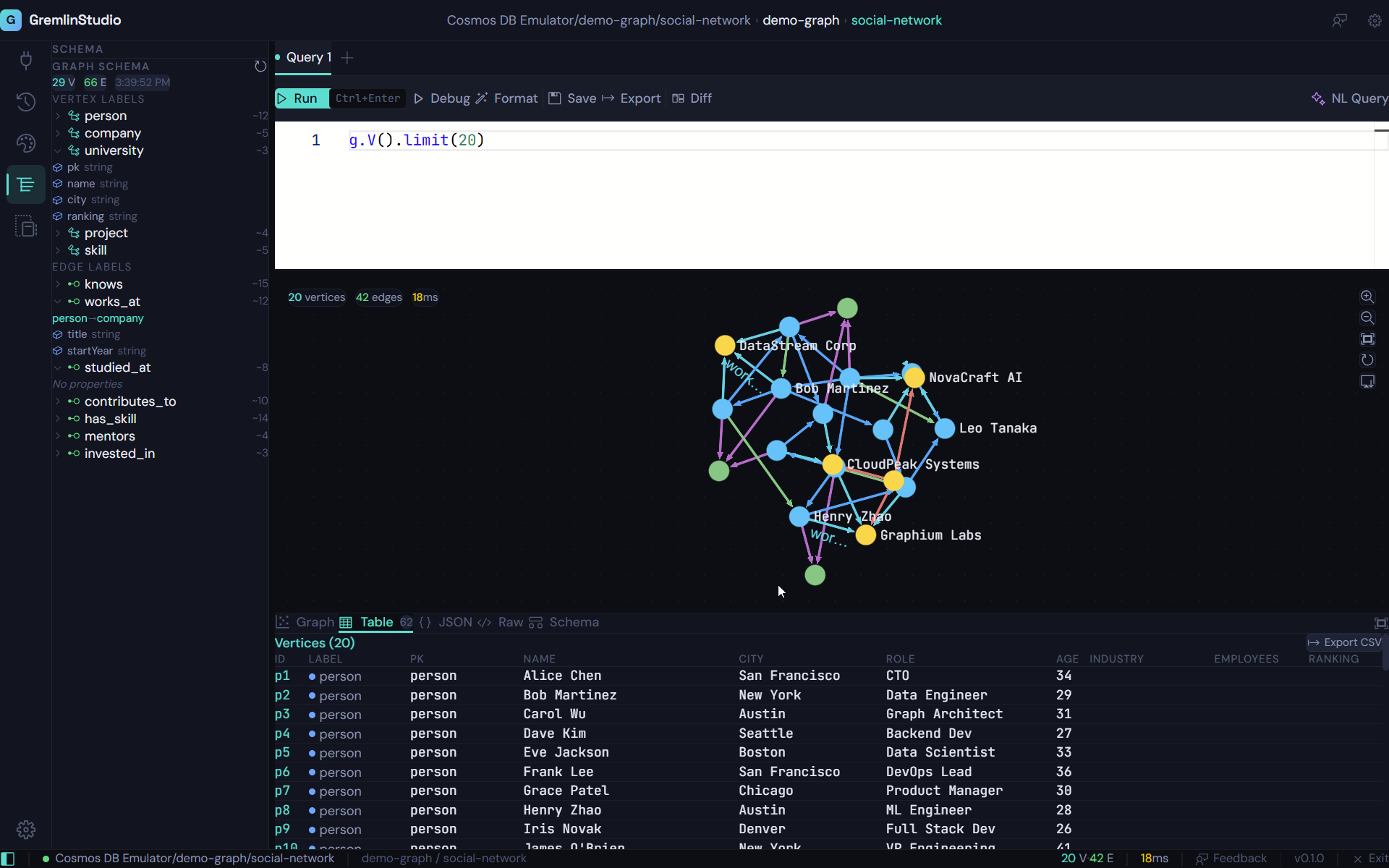
Write Gremlin queries with the same editor that powers VS Code. Syntax highlighting, intelligent autocomplete, multi-tab support, and instant execution.
Why a Dedicated Gremlin Editor Matters
Gremlin is a powerful graph traversal language, but writing it in a plain textarea or the Azure Portal's minimal editor is painful. You lose track of nested steps, miss closing parentheses, and can't remember the exact name of that predicate you need. A dedicated editor with Gremlin-aware features eliminates these friction points.
GremlinStudio uses the Monaco editor — the same engine behind Visual Studio Code — with a custom Gremlin language definition. You get real syntax highlighting that distinguishes steps, predicates, strings, and numbers at a glance. Autocomplete suggests available Gremlin steps as you type, so you spend less time checking documentation and more time exploring your data.
Multiple Result Views
After executing a query, GremlinStudio presents the results in four views: a sortable table for structured data, a collapsible JSON tree for detailed inspection, a raw text view for debugging, and an interactive graph visualization. Switch between views with one click, or open graph view in full-screen mode for presentations and exploration.
Query results stay attached to their tab, so you can switch between multiple queries and their results without re-executing anything. Click a row in the table view to highlight the corresponding node on the graph. Export any result set to CSV with one click.
Monaco Editor
The same editor engine that powers VS Code, customized for Gremlin. Full syntax highlighting, bracket matching, and keyboard shortcuts you already know.
Gremlin Autocomplete
Intelligent code completion for Gremlin steps, predicates, and common patterns. Type less and write correct queries faster.
Multi-Tab Support
Work on multiple queries simultaneously with tabbed editing. Each tab maintains its own query state, results, and execution history.
Execute with Ctrl+Enter
Run your query instantly with a keyboard shortcut. See results in table, JSON, raw, or graph view — all in the same IDE.
Query History
Every query you run is automatically saved. Search, filter, and re-run previous queries. Never lose a query you wrote last week.
Query Templates
Save commonly used queries as templates. Build a library of reusable Gremlin patterns for your team and your projects.
Who is this for?
Writing Complex Traversals
Gremlin queries can be deeply nested and hard to write in a plain text editor. Monaco gives you syntax highlighting, bracket matching, and autocomplete to keep you productive.
Iterating on Queries
Open multiple tabs to compare different approaches to the same query. Use query diff to see exactly how two traversals differ.
Learning Gremlin
New to the Gremlin query language? Autocomplete helps you discover available steps and predicates as you type.
Ready to try GremlinStudio?
7-day free trial with all Pro features. No credit card required.
Download Free Trial